ROFR Record Missing in Meebhoomi? Fix It Now Update 2026
If you’ve noticed that your ROFR (Record of Forest Rights) is missing in the Meebhoomi portal, you’re not alone. Many landowners, especially those with tribal or forest rights, face this issue. The ROFR is an important legal record for land rights related to forests, especially in tribal areas, and it’s crucial for both legal recognition and land transactions.
Here’s what to do if your ROFR record is missing in Meebhoomi.
What Is the ROFR and Why Is It Important?
The ROFR or Record of Forest Rights is a legal document that acknowledges the rights of forest-dwelling communities over forest land. It is granted to people under the Forest Rights Act (FRA) and is essential for ensuring that tribal communities or individuals have formal rights to their ancestral forest lands.
If your ROFR record is missing, it can affect your eligibility for various benefits, government schemes, and legal rights associated with your land.
You can also read:FMB Map Not Matching Land? Here’s What to Do Update 2026
Steps to Fix the Missing ROFR Record in Meebhoomi
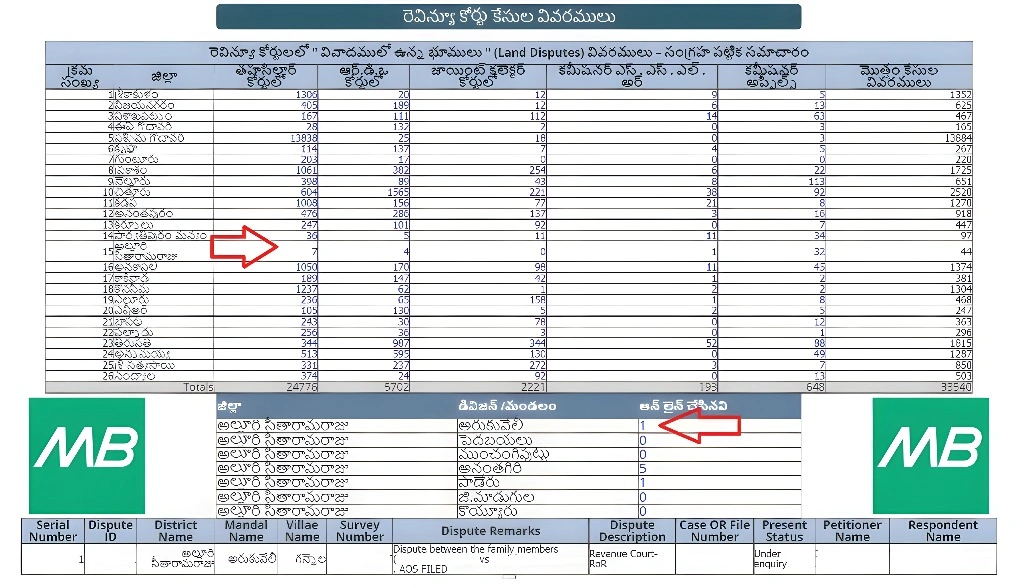
Before taking any action, make sure that the record is truly missing. Sometimes, the ROFR might be available in a different section of the Meebhoomi portal, or there might be a mistake in the search parameters.
Search thoroughly using different criteria (survey number, village name, etc.) to see if the record is linked elsewhere.
Check for alternative records like Adangal or 1B that might have the ROFR details included.
The ROFR record is generally maintained by the Revenue Department in coordination with the Forest Rights Committee. It’s possible that the record hasn’t been updated in the Meebhoomi portal yet.
Verify the documentation: Ensure that all necessary documentation for the forest rights claim (like community consent, land verification, etc.) has been submitted and approved by the committee.
Contact your local Forest Rights Committee or the Forest Rights Officer (FRO) to ensure your ROFR certificate has been issued and processed correctly.
If you’ve confirmed that your ROFR record should be in the system but isn’t showing up, you can submit a complaint or correction request through the Meebhoomi portal:
- Login to the Meebhoomi portal using your OTP.
- Go to the Complaint/Grievance section of the portal.
- Choose the ROFR Record Missing option.
- Fill out the complaint form with details about the missing record.
- Attach necessary proof (e.g., ROFR certificate, Aadhaar card, survey number, etc.).
- Submit the request and note down the complaint ID for tracking.
Tip: Be specific in your complaint. Include all the details of the land and rights involved to avoid delays.
If the online method doesn’t work, you can take your complaint offline. Here’s how:
Request them to add the ROFR record to your Meebhoomi profile manually.
Visit the Mandal Revenue Office (MRO) or Tahsildar office in your district.
Bring the necessary documents, including:
Original ROFR certificate (if available).
Aadhaar card, land documents, or any other relevant proof.
Survey number and land details.
How Long Does It Take to Fix?
Common Mistakes to Avoid When Submitting a Correction Request
Extra Tips for Faster Resolution
FAQs
Final Words
Having a missing ROFR record on the Meebhoomi portal can cause issues with your legal rights and eligibility for government benefits. However, fixing the issue is straightforward. Start by verifying the record’s status, contact the Forest Rights Committee for confirmation, and if necessary, submit a correction request on the portal or visit the Revenue Office for manual updates.
By staying proactive and organized, you can ensure that your ROFR is properly reflected in the system and that your land rights are protected.